Key Takeaways
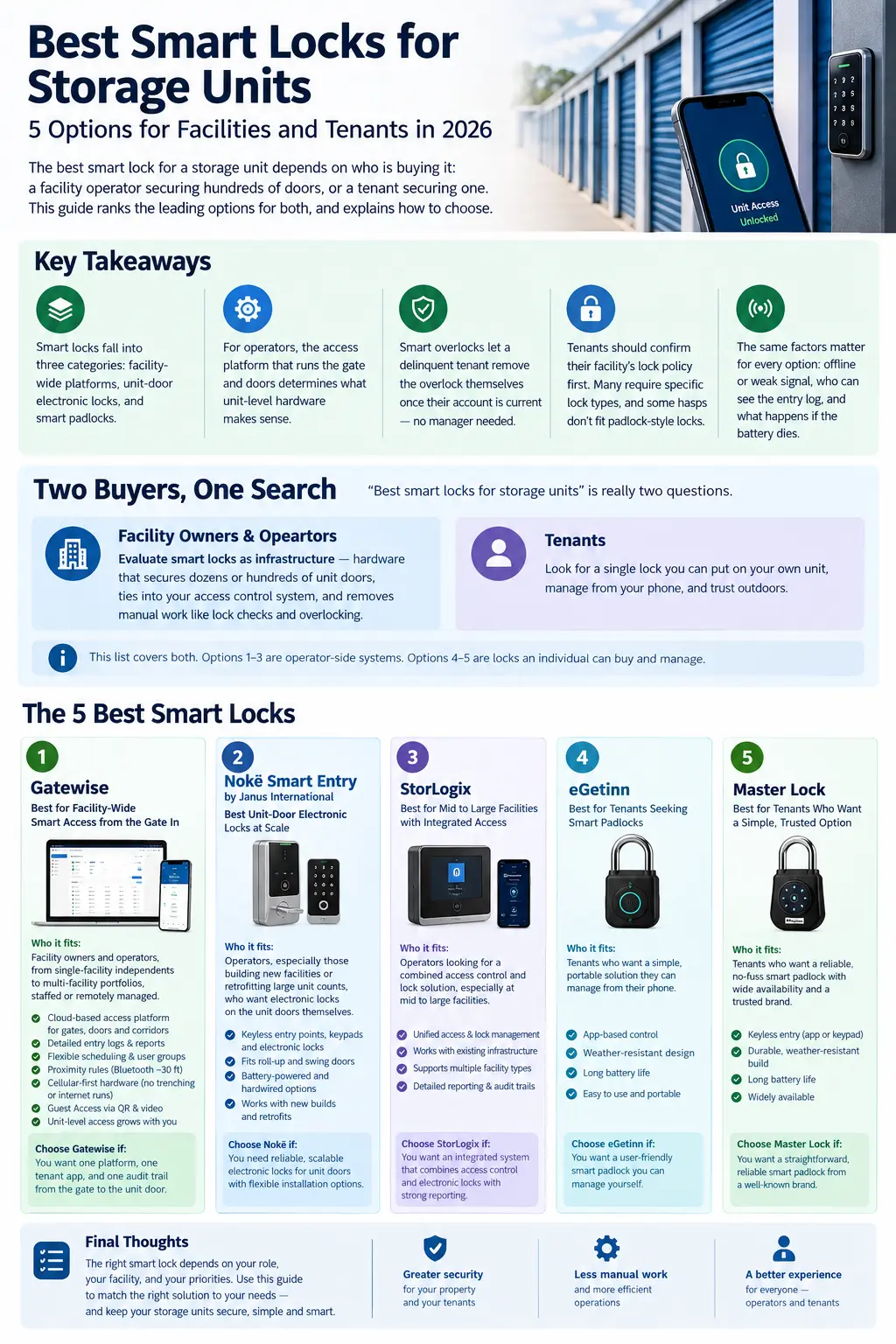
"Best smart locks for storage units" is really two questions.
If you are a facility owner or operator, you are evaluating smart locks as infrastructure: hardware that secures dozens or hundreds of unit doors, ties into your access control system, and removes manual work like lock checks and overlocking.
If you are a tenant, you are looking for a single lock you can put on your own unit, manage from your phone, and trust outdoors.
Both buyers land on this page, so this list covers both. Options 1 through 3 are operator-side systems. Options 4 and 5 are locks an individual can buy and manage. Each entry states who it fits.
One disclosure up front: Gatewise appears on this list, and Gatewise is our platform, so read that entry knowing where it comes from. We have kept every description factual, and the competing products here are genuinely good at what they do.
Who it fits: Facility owners and operators, from single-facility independents to multi-facility portfolios, staffed or remotely managed.
Gatewise approaches the storage unit lock question from the platform level. Before any unit door gets a smart lock, the facility needs a system that manages who can enter at all: the perimeter gate, pedestrian doors, and interior corridors. Gatewise provides that layer as a cloud-based portal that manages all gates and access doors from any desktop, laptop, or tablet, with tenant access on the smartphone they already carry.
What that platform approach means in practice: entry logs filterable by date range, access point, or user, and exportable for record-keeping; scheduling that flexes by user group, including around-the-clock access for the tenants who need it; proximity rules that require tenants to be within Bluetooth range, roughly 30 feet, to open designated short-range access points; and cellular-first hardware that installs with no trenching, no internet runs, and no infrastructure overhaul. Guest Access handles walk-up visitors and prospects over QR and video, with no dedicated phone line and no legacy intercom hardware.
Unit-level access extends from the same platform as facilities grow, scoped to your door types and layout through the quote process, so the gate, the corridors, and the unit doors run on one system with one entry log instead of a lock vendor bolted onto a separate access vendor.
Gatewise is an Allegion company, and the platform is trusted across 500,000+ units nationwide across the property types it serves.
Choose Gatewise if: you want one platform, one tenant app, and one audit trail from the perimeter gate to the unit door, with the unit-lock layer growing out of the access system rather than being bought separately.
Who it fits: Operators, especially those building new facilities or retrofitting large unit counts, who want electronic locks on the unit doors themselves.
The Nokē Smart Entry system by Janus International is a complete digital access solution made up of keyless smart entry points, smart keypads, and smart electronic locks that fit both roll-up and swing doors. The lock lineup spans a battery-powered lock that secures to the door with a four-bolt pattern and a hardwired, inside-the-door magnetic lock, and the newest addition combines Bluetooth with NFC so tenants can access the lock even after the battery is beyond its five-year guaranteed life.
The operational pitch is strong: unit-door smart locks automate labor-intensive processes like lock checks and overlocking. The tradeoffs to weigh are hardware cost per door across a large unit count and the fact that Janus is first a door and building manufacturer, so the system shines brightest paired with Janus doors and new construction.
Choose Nokē if: electronic locks on every unit door are the goal, particularly in new builds or major renovations where per-door hardware is part of the construction budget.
Who it fits: Operators who want to modernize one specific workflow, overlocking and vacant-unit control, without changing the locks tenants use daily.
DaVinci Lock takes a hybrid approach: a combination disc lock integrated with a software platform, with a unique serial code engraved on each lock. When a delinquent tenant brings their account current, they receive the unlock code by providing the serial number, removing the overlock process from facility managers entirely and allowing it to happen even during off-hours. The same mechanism secures vacant units: a new renter gets the code at move-in and removes the lock themselves.
It is not a smart lock in the electronic sense. There is no Bluetooth, no battery, and no per-entry log at the unit door. That is also its appeal: nothing to charge, nothing to network, and a narrow, well-solved problem. It pairs naturally with a facility access platform handling the gate and doors.
Choose DaVinci if: overlock and vacant-unit workflows are the pain point, especially at facilities running with little or no on-site staff.
Who it fits: Tenants who want a robust outdoor smart padlock, and small operators securing a handful of shared doors, gates, or containers.
Master Lock's Bluetooth outdoor padlock line brings the company's hardware reputation to app-managed access. The outdoor model carries a heavy-duty body covered in a weather-resistant housing with anti-shim technology in the locking mechanism and a two-piece weatherproof cover to protect against outdoor conditions. Access is shared from the app, temporarily or permanently, with a backup directional code on the lock's keypad and a battery-jump option for temporary access if the battery dies while locked.
For a tenant, that means phone-based entry to their own unit plus the ability to grant a family member access without handing over a key. The main cautions: it is a padlock, so it only fits hasps designed for one, and battery upkeep is on the owner.
Choose Master Lock if: you want a proven hardware brand in smart padlock form, with app-based sharing and a physical backup entry method.
Who it fits: Tenants and small operators who need to grant access remotely, including to people who will never download an app.
The Igloohome Smart Padlock's differentiator is its PIN technology: PIN codes work immediately without the padlock being connected to the internet and without the owner being near the device, and duration of access can be set from one-time to recurring to permanent. Codes travel over any messaging channel, and Bluetooth keys via the app are the second unlock method. Security features include an alarm that locks the padlock out after several incorrect PIN inputs and a relock reminder if the shackle is not fastened properly.
The offline design suits storage environments with weak or no connectivity at the unit corridor. As with any padlock, hasp compatibility and battery maintenance are the practical checks before buying.
Choose Igloohome if: remote, time-limited PIN access without an app requirement is the feature that matters most.
Work top-down, not door-up.
Start with the access platform, not the lock. The system managing your gate and facility doors defines your tenant app, your entry log, and your integrations. Unit-level hardware should extend that system, not create a second one. If you have not settled the platform layer yet, start with our complete guide to self-storage access control, and the physical gate itself is covered in our self-storage gate access guide.
Match the lock category to the workflow you are fixing. Electronic unit-door locks (Nokē) automate lock checks and daily unit access. Smart overlocks (DaVinci) automate delinquency and vacancy workflows. A platform-first approach (Gatewise) unifies the facility with a path to unit-level access as you grow.
Pressure-test the failure modes. What happens in weak signal, in a dead-battery scenario, and during a power outage? Who can pull the entry history, and how fast? Any option on this list has an answer; make sure it is one your operating model can live with.
Scope hardware through a quote, not a spec sheet. Door types, hasp designs, corridor layouts, and climate all change the right answer. That is a site-specific conversation, and it is exactly what a demo walkthrough is for.
Three checks before you buy any smart padlock for a storage unit:
And if your facility already runs a modern access platform, ask what unit-level options it supports before buying standalone hardware. One system for the gate and the unit beats two apps and two logs.
What is the best smart lock for a storage unit? It depends on the buyer. For facility operators, the strongest results come from a facility-wide access platform with unit-level access extending from it, or dedicated unit-door electronic locks at scale. For tenants securing their own unit, a Bluetooth or offline-PIN smart padlock is the practical choice, provided the facility's hasp and lock policy allow it.
Can I put my own smart lock on my storage unit? Usually, but confirm first. Facilities set lock policies, and some latch designs only fit disc or cylinder locks. Ask your facility manager before buying, and check whether the facility's access system already offers a supported unit-level option.
What is a smart overlock? A smart overlock combines a serialized mechanical lock with software. When a delinquent tenant pays their balance, the system gives them the code to remove the overlock themselves, with no manager needed on site. The same mechanism secures vacant units until a new rental begins.
Do smart locks for storage units work without internet? The good ones are designed for it. Offline-PIN padlocks generate codes that work without any connection at the lock, Bluetooth locks authenticate locally between phone and lock, and cellular-first facility platforms keep gates and doors running independently of facility internet.
What happens if the smart lock battery dies? Every credible option has a fallback: backup keypad codes and battery-jump features on Bluetooth padlocks, emergency jumpstart on offline-PIN locks, NFC power harvesting on newer unit-door locks, and multi-method access on facility platforms. Check the specific fallback before you buy, because it is the feature you will care about most on the day you need it.
Gatewise offers a simple and modern gate entry system that provides residents with a mobile app and managers with a cloud-based management portal.